Making AWS TEAM Private: Everything but the Login Page
TEAM, short for Temporary Elevated Access Management, is AWS's open source answer to just in time access for IAM Identity Center. A user asks for a permission set in an account for a few hours, someone approves it, TEAM creates the assignment, and when the time is up it removes it. Every session's API activity is pulled into the request so an auditor can see what was done with the access.
It is a good tool, and it is the right shape for the problem. It is also, as shipped, a public website.
A while back I deployed TEAM at a regulated enterprise, and their architecture and security teams balked at exactly that. Their rule was that internally built tooling that hands out privileged access does not have an inbound path from the internet. TEAM's single page app is served from Amplify Hosting, which is a public CloudFront distribution. Its GraphQL API is a public AppSync endpoint. Authentication is the only thing standing in front of either one. TEAM went in, but only under a security exception that had to be filed, justified, and reevaluated every year.
I wanted to know how much work it would actually take to make that exception unnecessary. This post is what I built, what stayed public and why, and the bugs I found along the way. Some of them are mine. Several are upstream. One is AWS quietly closing a service that TEAM depends on.
The code is public in my fork: github.com/bcarpio/iam-identity-center-team.
What actually mattered
- Amplify Hosting cannot be made private. There is no internal mode. The SPA moves to an nginx container on Fargate behind an internal ALB.
- AppSync has a real private mode, and it covers subscriptions too. The catch is that every Lambda that calls the API now has to live in the VPC.
- Cognito's hosted login stays public. AWS offers no private path to it, so the honest move is to say so in writing.
- Private still needs a way out. Most of TEAM's AWS calls can go through VPC endpoints, but Cognito can't, and a
cognito-idpendpoint silently breaks request activation. - CloudTrail Lake closed to new customers on May 31, 2026. A fresh TEAM install fails outright, even if you turn audit logging off.
Why not just put WAF in front of it
The first suggestion anyone makes is a WAF IP allowlist on the CloudFront distribution. It doesn't meet the bar. The URL still resolves on public DNS, the origin still answers on the internet, and WAF only filters what reaches it. When a security reviewer asks "is there an internet reachable origin," the answer is still yes.
The rule I worked to is the one that reviewer would check: nothing TEAM runs has an inbound path from the internet. That does not mean the VPC has no route out. TEAM's Lambdas still call AWS APIs like Identity Center and Organizations. Private here means inbound, and the network section below covers what still has to go out.
What changed
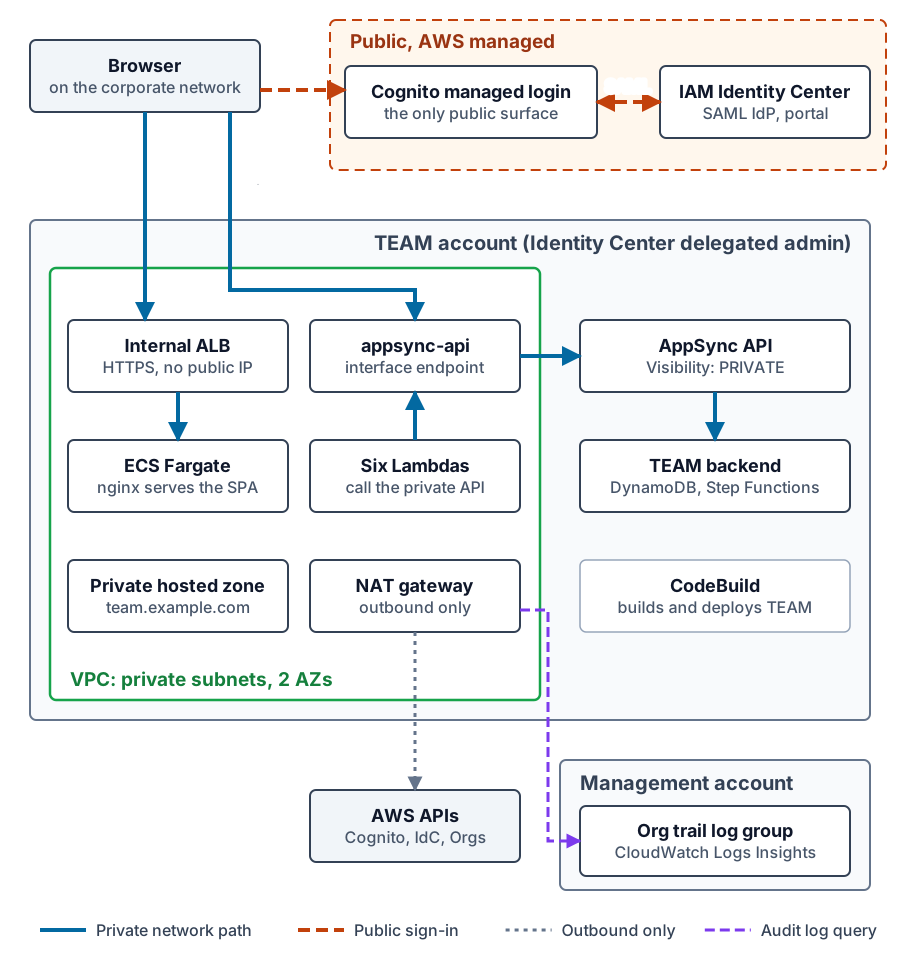 Tap to view full size
The approval workflow, the data model, and the Identity Center integration are untouched. Everything I changed is about how TEAM is hosted and reached.
- The SPA is built into an
nginx-unprivilegedimage and runs on ECS Fargate behind an internal Application Load Balancer, with an ACM certificate and a record in a private hosted zone. The security headers that lived in Amplify'scustomHttp.ymlmoved into the nginx config. No CloudFront, no WAF. - The AppSync API is created with
Visibility: PRIVATEand is reachable only through theappsync-apiinterface VPC endpoint with private DNS. That one endpoint carries queries, mutations, and the realtime subscription websocket. - Six Lambdas call AppSync from the backend, so they run in private subnets now. The rest of TEAM's functions stay outside the VPC as they are upstream.
- Build and deploy moved to a CodeBuild project that runs a headless
amplify push, builds the frontend, pushes the image to ECR, and deploys the UI service. The Amplify Gen1 CLI is still the backend deployer, but Amplify Hosting is gone.
Making the API private is a single property override in the Amplify project:
// amplify/backend/api/team/override.ts
// Private API: reachable only via the appsync-api interface VPC endpoint.
// Immutable after creation, changing it replaces the API.
resources.api.GraphQLAPI.addPropertyOverride('Visibility', 'PRIVATE')
Note the comment. Visibility cannot be changed on an existing API. On a fresh install that doesn't matter. On a running TEAM it means a replacement API, so treat it as a migration, not a setting.
Prerequisites: you bring the network
TEAM does not create a network. Before you deploy, you need:
- A VPC with private subnets in two Availability Zones. The internal ALB needs two, and the six Lambdas and the UI task run in them.
- The
appsync-apiinterface endpoint with private DNS enabled. This is the one hard requirement, because a private AppSync API is reachable through nothing else. - Outbound internet access from those subnets. Private here means no inbound path. TEAM still calls public AWS APIs on the way out, and as I found below, at least one of them can't go through a VPC endpoint.
- A route from your users to the VPC. Direct Connect, VPN, or Transit Gateway, so browsers can reach the internal ALB and the AppSync endpoint.
- The IAM Identity Center region. TEAM's Lambdas call Identity Center in their own region, so deploy it there.
Outbound doesn't have to mean a NAT gateway in the TEAM account. A Transit Gateway out through Direct Connect and your own datacenter works. So does a central outbound DMZ, like the bump in the wire design with Palo Alto firewalls behind a Gateway Load Balancer that I wrote about in centralized inspection with GWLB and Palo Alto. My lab uses one NAT gateway, which with the appsync-api endpoint runs about $45 a month on top of the Fargate task and the ALB.
How far VPC endpoints can shrink egress
I wanted to know whether a team with no internet route at all could run this, so I removed the NAT gateway and replaced it with endpoints. Most of TEAM didn't notice: sso, identitystore, states, sts and logs for the Lambdas, ecr.api and ecr.dkr for the Fargate image pull, and gateway endpoints for DynamoDB and S3. Organizations worked too, through a cross-region endpoint, because its endpoint exists only in us-east-1.
Cognito is the one that broke, and the way it broke is worth knowing. TEAM's router Lambda calls Cognito's ListUsers to look up the requester's email. With a cognito-idp endpoint in place, every request sat in pending, and the Lambda logged this:
InvalidParameterException: PrivateLink access is disabled for the
user pool that has ManagedLogin configured.
Cognito does not accept PrivateLink calls for any user pool that has a domain, and TEAM's pool needs one for managed login. The trap is that the endpoint's private DNS captures cognito-idp.us-east-2.amazonaws.com for the whole VPC. Anyone tidying up a network by adding endpoints, or sharing a central one in, breaks TEAM even with NAT still in place.
So the floor is one hostname. Don't put a cognito-idp endpoint in front of TEAM's VPC, and allow cognito-idp.<region>.amazonaws.com on 443 outbound through whatever egress you have. Everything else can stay on endpoints if your policy requires it, at roughly $115 a month for the extra eight.
The one thing that stays public
Cognito managed login is still on the internet. That is not a gap in this design, it is how Cognito works. The Amazon Cognito documentation is explicit that requests to the user pool domain endpoints are public and can only be made over public internet paths.
What matters is what that does and does not expose. The browser goes to Cognito's hosted domain the same way it goes to the IAM Identity Center portal, which is also public. Cognito federates to Identity Center over SAML and redirects back to the private UI. Nothing inside the VPC calls Cognito's domain, and no TEAM origin or API becomes reachable because of it.
I wrote that down as an architecture decision record in the repo, with the AWS documentation quoted, so the security review has one page that says what is private, what is public, and why. That page is what I would hand to the team that owns the security exception.
The way to close the last gap is to replace Cognito with a SAML service provider inside the UI container. That's phase 2, and it is not built yet.
Testing a UI you can't reach
An internal ALB is unreachable from a laptop by design. Real users get to it over Direct Connect, VPN, or Transit Gateway. My lab has none of those, so I used a small EC2 instance in a private subnet with no public IP and a security group with no inbound rules.
SSH runs inside an SSM session (AWS-StartSSHSession), so port 22 is never exposed, and DynamicForward 1080 turns it into a SOCKS5 proxy. Point a browser profile at it and DNS resolves on the far end of the tunnel, inside the VPC, which is the only place the private hosted zone and the private AppSync names exist:
chrome --user-data-dir="$HOME/.chrome-team" \
       --proxy-server="socks5://127.0.0.1:1080"
The SOCKS5 part matters. SSH's DynamicForward only speaks SOCKS, and with socks5 Chrome sends hostnames to the proxy instead of resolving them locally, so the VPC resolver answers. With socks4, Chrome resolves on your laptop and fails.
That sends every request through the tunnel, Cognito's login page included, which only works while the tunnel host can reach the internet. When I removed the NAT gateway, sign-in timed out. A PAC script that sends only the TEAM and AppSync hostnames to SOCKS and everything else direct fixes that, and it's closer to what a real user on the corporate network gets. Current Chrome ignores file:// PAC URLs, so pass the script inline as a base64 data: URL.
The bugs
This is the part I didn't plan for.
CloudTrail Lake is closed, and TEAM won't install without it
TEAM's session activity logs are built on CloudTrail Lake. The install creates an event data store, and when a session ends, TEAM queries it for everything that role did in that window.
AWS stopped accepting new CloudTrail Lake customers on May 31, 2026. Existing customers keep working. Anyone else gets this on their first deploy:
CREATE_FAILED  myEventDataStore  AWS::CloudTrail::EventDataStore
Invalid request provided: CloudTrail Lake is no longer accepting new
customers. Existing customers can continue to use their event data stores.
TEAM has a setting for this, CloudTrailAuditLogs, and one of its values is none. Upstream still created the event data store when it was set to none, with ingestion turned off. So there is no configuration of stock TEAM that installs in a new account today. Upstream has open issues for it (#511, #586).
The first fix was small: none now really means none, and no event data store is created. That gets you an install without audit logs.
The replacement, and three bugs in it
There is an open upstream pull request, #599, that adds CloudWatch Logs Insights as an alternative backend. If you run Control Tower, your organization trail already delivers every management event to a CloudWatch log group in the management account. TEAM assumes a role there and runs a Logs Insights query instead of a Lake query. Nothing new to buy, nothing new to ingest.
I pulled it into the fork. It didn't work, for three separate reasons.
logs:GetQueryResults doesn't support resource level permissions. The PR scoped both query actions to the log group's ARN. That is the right instinct and the wrong answer for this action. GetQueryResults takes a query ID, not a log group, so a policy that names a resource never matches and the call is denied every time. I confirmed it with the IAM policy simulator before changing anything: implicitDeny with the ARN, allowed with *. StartQuery is the call that touches the log group, and it stays scoped to it:
{
  "Effect": "Allow",
  "Action": "logs:StartQuery",
  "Resource": "arn:aws:logs:us-east-1:111122223333:log-group:aws-controltower/CloudTrailLogs-abc:*"
},
{
  "Effect": "Allow",
  "Action": "logs:GetQueryResults",
  "Resource": "*"
}
Two Lambdas, two roles. One function starts the query and another fetches the results, and Amplify gives them different execution roles. The cross account role in the management account has to trust both, or the second half of every lookup fails with an AssumeRole error.
The log group name has a suffix. The PR's docs say Control Tower's log group is aws-controltower/CloudTrailLogs. In a real Control Tower landing zone the name has a random suffix, like aws-controltower/CloudTrailLogs-abc. Copy the documented name and the query has nothing to run against.
With those three fixed, the role created in the management account, and the backend pointed at the right log group, it works. I requested a permission set, made a few calls with it, and they showed up in the request's session activity panel a few minutes later.
Revoked requests that ended in 1969
After revoking a request, the history page showed its end time as Wednesday, December 31, 4:00 PM. That's zero time, the Unix epoch, rendered in Pacific time.
The end time was in DynamoDB. It just wasn't there yet. TEAM's revoke state machine flips the request's status to revoked, and then, a few seconds later, writes endTime directly to DynamoDB. That write skips AppSync, so no subscription fires and the page never hears about it. Load the history in that window and the end time is null, and JavaScript turns new Date(null) into the Unix epoch, which in Pacific time is December 31, 1969. If the revoke fails, the end time is never written at all.
The admin audit page already guarded against this. The user's own history page didn't. The same null also reached the session log lookup, where new Date(NaN).toISOString() throws, so that path now falls back to the request's last update time.
Running the Amplify CLI without Amplify Hosting
The rest were mine, caused by moving the build off Amplify Hosting and into CodeBuild. They're worth listing because anyone who runs the Amplify Gen1 CLI headless will hit them.
- The app name. One of TEAM's setup steps finds its Amplify app by the name
TEAM-IDC-APP. A headlessamplify initnames the app after the project, and the CLI only allows letters and digits, so it becameTEAMIDCAPPand the lookup found nothing. The build now renames the app beforeamplify push. configLevel: generalis half supported. I pointed the CLI at CodeBuild's credentials withconfigLevel: general. Most of the CLI is fine with that. The auth trigger uploader, which runs after the CloudFormation push has already succeeded, is not. It crashed withCannot read properties of undefined (reading 'region'), and the CLI reported it asUnable to upload trigger files to S3. The fix was to write the container credentials to a named profile and useconfigLevel: project, which is what Amplify Hosting does itself.- nginx on Fargate. The unprivileged nginx image runs as uid 101 and failed on start with
mkdir() "/tmp/proxy_temp" failed (13: Permission denied). On Fargate, an empty scratch volume is owned by root unless the image declares aVOLUMEat the same path, in which case ECS copies the image's ownership. Declaring/tmpand/var/cache/nginxas volumes in the Dockerfile fixed it.
One more habit worth stealing: when amplify push fails, print the tail of the CLI's own log. The console error is a summary, and the real cause is in ~/.amplify/logs, which disappears with the build container.
Wrapping up
The private part of this was less work than I expected. Amplify Hosting has no private mode, but nginx on Fargate behind an internal ALB is a well worn pattern, and AppSync's private mode does exactly what it says. The real cost is the six Lambdas that move into the VPC, and the network you have to provide around them.
The surprises were everywhere else. An AWS service closure that breaks a fresh install even with the feature turned off. An open fix for it with three bugs of its own. A UI race that makes revoked access look like it ended before the request was made. None of it is hard to fix once you see it, which is the case for publishing it.
TEAM still has one public surface, Cognito's login page, and the ADR in the repo says so in writing. If you are taking this to a security review, that document is the part to bring.
The fork is at github.com/bcarpio/iam-identity-center-team.
Brian Carpio has spent 28 years in technology and 14 building enterprise cloud infrastructure on AWS, and ships AI in production daily. He writes about context engineering, governance, and the operating models that make AI-assisted development hold up at scale.