Centralized AWS Inspection with GWLB and Palo Alto
A few years ago I inherited the build work from a security engagement that had stalled at a large regulated enterprise. One piece of it was a network redesign. Every VPC in what the company called its connected accounts had no internet gateway and no NAT gateway. All traffic, in both directions, went over the Transit Gateway, down Direct Connect, and out through the data center's internet edge.
That worked, but it meant every byte of cloud egress made a round trip to a data center, the security team had no cloud native inspection point, and any team that needed a public endpoint had to file tickets with three different groups.
The target design was a dedicated DMZ account that owned the internet edge for the whole organization, with Palo Alto VM-Series firewalls inspecting all inbound and outbound traffic in a bump in the wire pattern behind a Gateway Load Balancer. I owned the AWS side. A Palo Alto consultant owned the PAN-OS and Panorama configuration. We went back and forth on the design many times before it was approved, and most of that debate came down to a handful of details that the reference diagrams skip.
This post is those details, plus an honest look at which parts I would still build the same way today.
What actually mattered
- Appliance mode on every TGW attachment in front of the firewalls. Without it, return traffic lands on a different firewall and the session dies.
- Client IP preservation off on the DMZ NLB. Replies come back through the ingress path instead of hitting the egress firewalls. AWS doesn't support preservation across a transit gateway anyway.
- Edge routes that target each public subnet's exact CIDR, one per AZ, so inbound traffic is inspected in its own zone.
- Static private IPs on the spoke NLB, because the DMZ NLB targets it by address.
- Rebalance on firewall failure helps, but it doesn't save long-lived TCP connections. They still reset.
The shape of it
 Tap to view full size
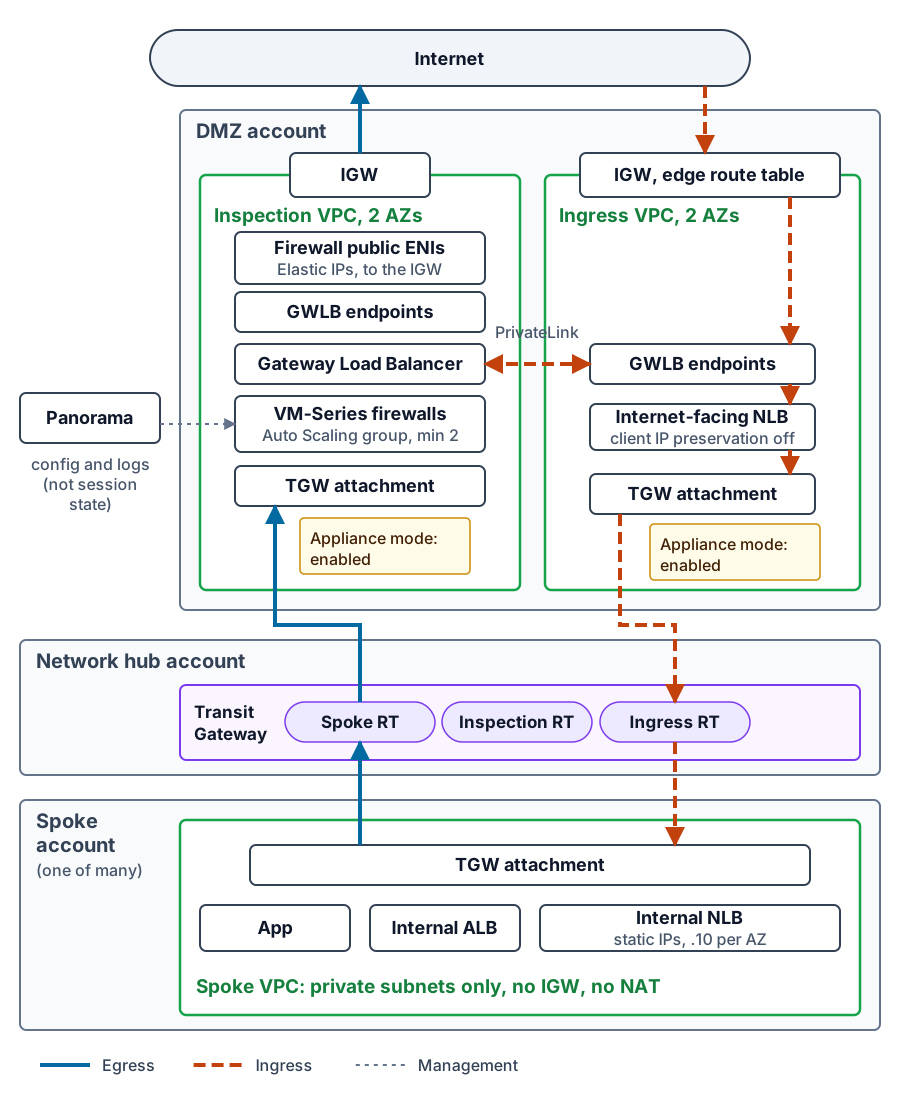
There are four kinds of accounts involved:
- Spoke accounts. Private subnets only. No internet gateway, no NAT. A default route to the Transit Gateway.
- The network hub account. Owns the Transit Gateway. In my case the network engineering team owned this account, so the DMZ code never created the TGW. It assumed a role into the hub account to create attachments and routes.
- The DMZ account, with two VPCs:
- An inspection VPC holding the Gateway Load Balancer, the firewall fleet, its GWLB endpoints, and the public subnets where the firewalls' own public interfaces reach the internet.
- An ingress VPC holding the internet facing load balancers and a second set of GWLB endpoints for inbound inspection.
- A management plane for the firewalls. Panorama pushed configuration and collected logs.
The Transit Gateway uses three route tables: one for spokes, one for the inspection VPC attachment, and one for the ingress VPC attachment. Spokes send 0.0.0.0/0 to the inspection attachment, and the spoke route table also sends the ingress VPC's CIDR to the ingress attachment, which matters later. The inspection and ingress route tables know how to get back to every spoke.
Egress: spoke to internet
 Tap to view full size
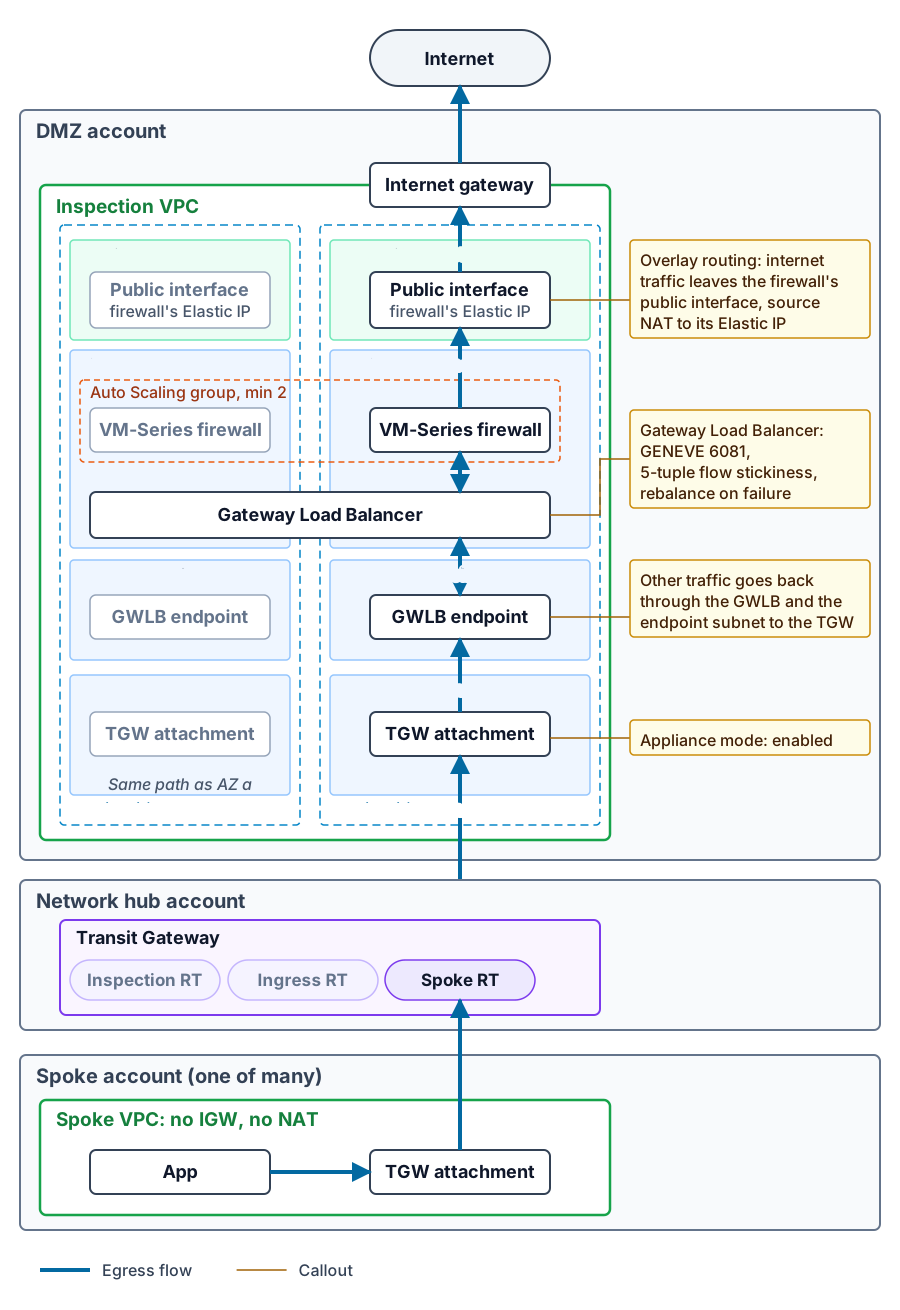
The outbound path looks like this:
- An application in a spoke sends traffic to the TGW using its default route.
- The TGW spoke route table sends it to the inspection VPC attachment.
- In the inspection VPC, the TGW attachment subnet routes 0.0.0.0/0 to the GWLB endpoint in the same Availability Zone.
- The GWLB endpoint hands the packet to the Gateway Load Balancer, which wraps it in GENEVE on port 6081 and delivers it to one firewall. GENEVE is a standard tunneling protocol that runs over UDP port 6081: the original packet rides inside it unchanged, so the firewall sees the real source and destination.
- The firewall inspects it. The firewalls run with GWLB overlay routing enabled, so instead of handing internet-bound traffic back to the GWLB, the firewall routes it out its own public interface and translates the source to that interface's Elastic IP.
- The firewall's public subnet routes 0.0.0.0/0 to the internet gateway.
Return traffic comes back to that Elastic IP, which belongs to the firewall that sent the request, so internet egress is symmetric by construction. Everything else is not. Traffic the firewall hands back to the GWLB, which returns through the endpoint subnet to the Transit Gateway, and every inbound connection depend on the GWLB to keep both directions of a flow on one firewall. For those flows, whether the return traffic lands on the same firewall is the entire game.
The bump in the wire
A Gateway Load Balancer is not a proxy. It does not terminate connections and it does not change source or destination addresses. It hashes each flow, picks a target, and keeps sending that flow to that target for the life of the flow. By default the hash is the 5 tuple, and the reverse direction of a flow hashes to the same target. That is how you get stateful inspection across a fleet of independent firewalls without the firewalls sharing session state.
This is worth saying plainly because it confused people on our team: the VM-Series instances behind the GWLB are not an HA pair. There is no session synchronization between them. They are independent peers in an Auto Scaling group. Panorama makes them behave as one firewall from a policy point of view, but it shares configuration and logs, not sessions. The GWLB's flow stickiness is what keeps each conversation on one box.
The target group is where you decide what happens when a firewall goes away:
resource "aws_lb_target_group" "firewalls" {
                name        = "fw-geneve"
                target_type = "instance"
                protocol    = "GENEVE"
                port        = 6081
                vpc_id      = aws_vpc.inspection.id

                health_check {
                  protocol = "HTTPS"
                  port     = 443
                  path     = "/php/login.php"
                }

                target_failover {
                  on_deregistration = "rebalance"
                  on_unhealthy      = "rebalance"
                }
              }
With rebalance, existing flows on a failed firewall get rehashed to a healthy one after the deregistration delay, instead of being sent to a dead target and dropped. Be realistic about what that buys you. The new firewall has no session for a TCP connection that started elsewhere, so mid-stream packets usually get dropped as non-SYN traffic unless the firewall policy is relaxed to allow them. Rebalance mostly helps UDP and speeds recovery. Long lived TCP connections still reset.
I also enabled cross zone load balancing on the GWLB. That costs some cross AZ data transfer, but it means losing every firewall in one Availability Zone does not black hole that zone. With a minimum of two firewalls, one per AZ, I wanted that safety net.
Appliance mode is not optional
The GWLB can only keep a flow symmetric if both directions of the flow arrive at the same GWLB endpoint. Without help, the Transit Gateway will happily send the outbound packet into the inspection VPC in one Availability Zone and the reply into another. Different AZ, different endpoint, different firewall, broken session. Internet egress is spared this because its replies come back to the firewall's own Elastic IP. Every flow whose return trip crosses the Transit Gateway is not.
Appliance mode on the inspection VPC attachment fixes that by keeping both directions of a flow in the same AZ for the life of the flow:
resource "aws_ec2_transit_gateway_vpc_attachment" "inspection" {
                transit_gateway_id     = var.transit_gateway_id
                vpc_id                 = aws_vpc.inspection.id
                subnet_ids             = aws_subnet.inspection_tgw[*].id
                appliance_mode_support = "enable"
              }
I set it on the ingress VPC attachment too. If you take one thing from this post, check this flag on every attachment in front of stateful appliances.
Ingress: internet to a private ALB
 Tap to view full size
Inbound was the harder half, because the requirement was that application teams could create their own public endpoints, every one of them inspected, without any public subnets in spoke accounts.
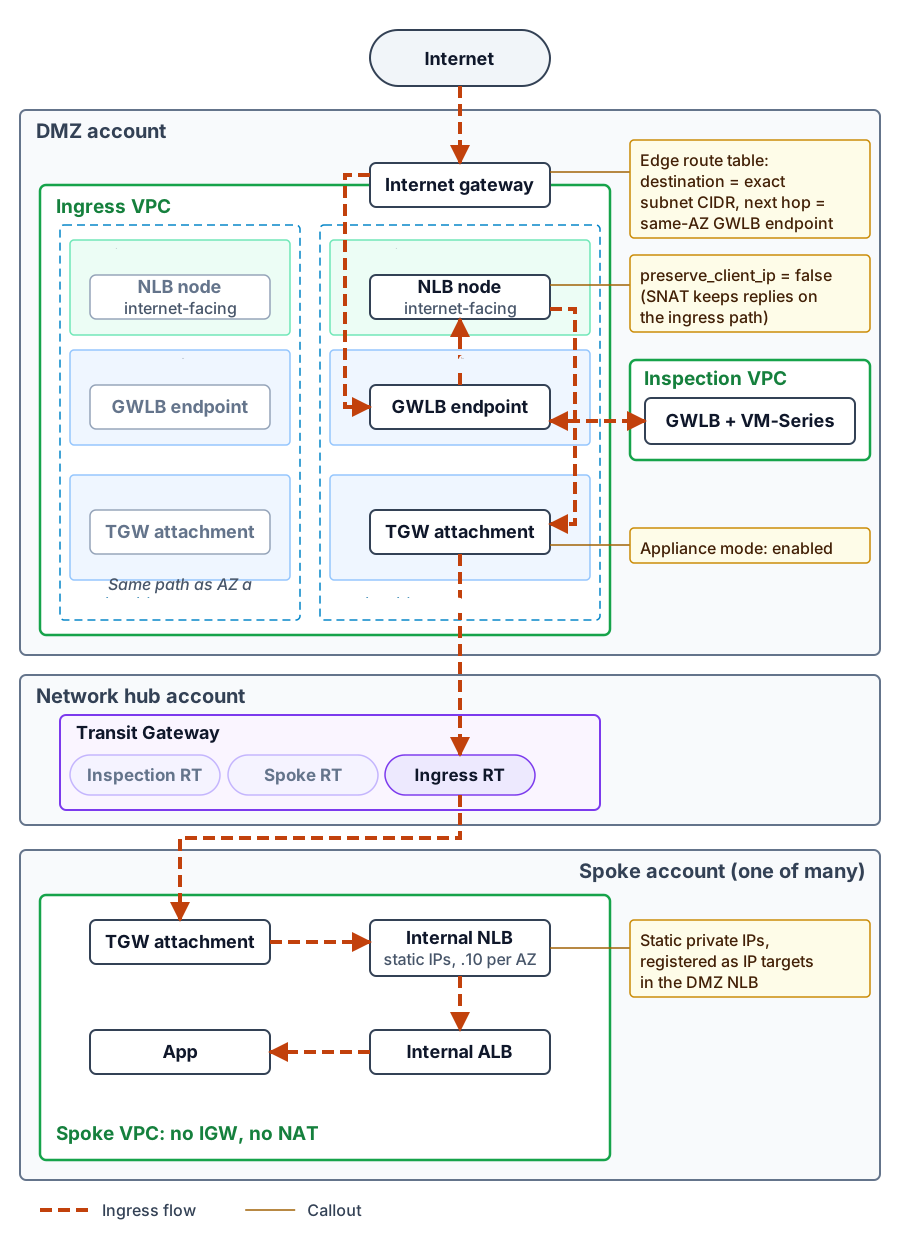
The chain we landed on:
- A client resolves the public NLB in the DMZ ingress VPC and connects to the NLB node in one AZ.
- The internet gateway has an edge route table. It routes the CIDR of each public subnet to the GWLB endpoint in that same AZ.
- The GWLB endpoint sends the packet through the GWLB to a firewall and back.
- The packet reaches the public NLB in the ingress VPC.
- That NLB's target group uses IP targets: the static private IPs of an internal NLB in the spoke account, reached across the Transit Gateway.
- The spoke NLB forwards to an internal ALB, which forwards to the application.
Two details here took real iteration.
Edge routes must target the exact subnet CIDR. AWS only allows edge route destinations to be the whole VPC CIDR or the whole CIDR of a subnet in that VPC. Use the subnet form, one route per AZ, so inbound traffic is inspected by the endpoint in its own zone instead of hairpinning across AZs.
resource "aws_route" "igw_to_gwlbe_az_a" {
                route_table_id         = aws_route_table.igw_edge.id
                destination_cidr_block = aws_subnet.ingress_public_a.cidr_block
                vpc_endpoint_id        = aws_vpc_endpoint.gwlbe_ingress_a.id
              }
The spoke NLB needs static private IPs. The DMZ NLB targets it by IP address. Without a pinned address, AWS picks one from the subnet, you only learn it after the load balancer exists, and a rebuilt load balancer gets a new one. Pin one address per subnet with subnet_mapping. Because these addresses sit outside the DMZ VPC, register each one in the DMZ target group with an explicit Availability Zone.
resource "aws_lb" "spoke_internal" {
                name               = "app-internal-nlb"
                load_balancer_type = "network"
                internal           = true

                subnet_mapping {
                  subnet_id            = aws_subnet.elb_a.id
                  private_ipv4_address = cidrhost(aws_subnet.elb_a.cidr_block, 10)
                }

                subnet_mapping {
                  subnet_id            = aws_subnet.elb_b.id
                  private_ipv4_address = cidrhost(aws_subnet.elb_b.cidr_block, 10)
                }
              }
The one setting that holds it together
AWS documents this as a limitation. What the docs don't explain is why it breaks, and that reason is the core of this design.
The DMZ NLB has client IP preservation turned off.
AWS does not support it when targets are reached through a transit gateway, and the packet walk shows why. The packet reaches the spoke with the real client's internet address as its source. The spoke replies to that address. The spoke's route table sends 0.0.0.0/0 to the Transit Gateway, and the spoke TGW route table sends it to the inspection VPC, not the ingress VPC. The reply lands on a firewall in the egress path that has never seen this connection. It gets dropped. Classic asymmetric routing, and it looks like a firewall problem when it is really a routing problem.
With client IP preservation off, the DMZ NLB rewrites the source to its own node address before the packet crosses the TGW. The spoke replies to that private address, the spoke route table's route for the ingress VPC sends the reply back to the ingress attachment, the NLB translates it back, and the response leaves through the same GWLB endpoint and the same firewall that inspected the request. Inbound is inspected exactly once, in the ingress VPC, and it never collides with the egress inspection path.
resource "aws_lb_target_group" "dmz_to_spoke" {
                name               = "app-ingress-tg"
                target_type        = "ip"
                protocol           = "TCP"
                port               = 443
                vpc_id             = aws_vpc.ingress.id
                preserve_client_ip = false
              }
For IP targets over TCP, off is already the AWS default. Set it explicitly anyway. It documents the decision, and it stops anyone who copies this target group from turning it on to get real client addresses. Across a transit gateway, it cannot give them client IPs. AWS does not support it, and the packet walk above is what they would be asking for. And when a network path like this breaks, nobody suspects one boolean on a target group. It takes hours to trace.
What it costs
The application never sees the real client IP. The DMZ NLB is layer 4, so it does not add an X-Forwarded-For header. The spoke ALB sees the DMZ NLB's address as the client. Proxy Protocol v2 would normally carry the original address through an NLB, but an ALB cannot accept Proxy Protocol, so that is not an option in this chain.
The real client IP still exists in the PAN-OS session logs, the ingress VPC flow logs, and the DMZ NLB access logs. In practice it means any control based on client IP, such as geo blocking, rate limiting, or allow lists, belongs on the firewall. An AWS WAF rule on the spoke ALB that matches client addresses will be matching DMZ NLB nodes.
Operational lessons
- Do not let the ASG trust GWLB health checks during bring up. The GWLB health check is HTTPS to the firewall's dataplane interface (with the management interface swap that GWLB deployments use, that is the instance's primary interface), and it fails until Panorama pushes an interface management profile allowing HTTPS from the GWLB subnets. If the Auto Scaling group uses ELB health checks from the start, it will terminate firewalls that are still bootstrapping, forever. Start with EC2 health checks and switch after the first config push.
- Scale on firewall metrics, not EC2 CPU. VM-Series can publish its own metrics to CloudWatch, such as dataplane utilization and session counts. Those are the real pressure signals. Host CPU tells you almost nothing about a firewall.
- Build a test harness for the full path. I kept a spoke VPC, test applications, and a complete NLB to NLB to ALB chain that I could stand up to prove the inbound and outbound paths end to end. Most of the asymmetric routing problems above showed up there first, not in production. Keep it out of the deployable root module or gate it so it can never apply to production.
- Treat routing as data. I defined every VPC route as a list of entries (subnet group, destination, next hop) fed through one module, instead of dozens of scattered route resources. When the question is "where does this packet go next," one table you can read beats a dozen files you have to search.
What I would change in 2026
The core of this design is still how you do centralized inspection on AWS with a third party firewall. Two things have changed around it.
If you do not need a third party firewall, the inspection VPC is optional now. Since mid 2025, AWS Network Firewall can attach directly to a Transit Gateway as a network function attachment. AWS builds and manages the VPC, subnets, and endpoints behind it, and appliance mode is turned on for you. That removes most of the infrastructure described above. It only works for AWS Network Firewall, though. Palo Alto and other third party firewalls still need the GWLB inspection VPC, or a managed offering such as Palo Alto's Cloud NGFW for AWS, which trades away control in exchange for not running the fleet yourself.
And "optional" assumes the firewall is only there to inspect cloud traffic. For a lot of network teams it is also how they see the whole network. Panorama gives them one place to write policy and read logs for every Palo Alto they run, in the data center, the branches, and the cloud. Replace the cloud side with AWS Network Firewall and that view splits in two: a second policy model, a second set of logs, and a second console, for the part of the network that is growing fastest. If your network team runs on Panorama, keep Palo Alto in the cloud path and accept the GWLB inspection VPC as the cost of a single view.
For inbound HTTP traffic, CloudFront can replace the NLB chain. CloudFront VPC origins let a distribution reach a private ALB or NLB with no public subnets, and since late 2025 that works across accounts using AWS RAM. A central networking account can own the distributions while each team's internal ALB stays private in its own account. No static NLB IPs, no TGW route per application, and CloudFront passes the real client address to the origin, which fixes the cost described above.
The tradeoff is the inspection point. With CloudFront, inbound protection is CloudFront plus AWS WAF, not a next generation firewall. If your security team requires an NGFW in front of everything that faces the internet, the ingress design in this post is still the answer. If they will accept WAF at the edge, I would build inbound on CloudFront today and keep the Palo Alto fleet for egress and east-west traffic.
Wrapping up
None of the individual pieces here are exotic. GWLB, appliance mode, edge routes, and NLB IP targets are all documented. What is not documented is how they interact, and that is where all the time went: a flow hash that only works if the TGW keeps both directions in one AZ, an edge route that has to target a subnet instead of a VPC, and a single NLB setting that decides whether inbound replies come back through the firewall that saw the request or a different one that drops them.
If you are building this, start with the packet walk for both directions before you write any Terraform. Every hard problem in this design shows up on paper first.
Brian Carpio has spent 28 years in technology and 14 building enterprise cloud infrastructure on AWS, and ships AI in production daily. He writes about context engineering, governance, and the operating models that make AI-assisted development hold up at scale.