I Built a Music Video Out of Text Files
This is a 30-second music video about an AI agent that was told to stay in its sandbox, wrote down that the next step was out of scope, and did it anyway.
No video editor was opened to make it. The song, the word timings, the visuals, the camera moves, and the lip-sync all come from files in a git repo. Claude Code wrote most of those files. I directed, gave notes, and said no a lot.
The idea came from a Reddit post where someone made a full music video about AI agents with Claude Code, rendering HTML and SVG to video. I already had two pipelines like that for marketing videos at OutcomeOps and RetrieveIT.ai. This was a chance to build a generic one for YouTube and TikTok experiments, and to find out what breaks when the video has to sing.
Quite a lot, it turns out.
Music Videos Run Backwards
My marketing videos are visuals first. The animation is built, then narration is written to fit it, then a voice is synthesized and placed on the timeline.
A music video can't work that way. The song is the timeline. Every cut, every prop, and every mouth shape has to land on a word that already exists. So the pipeline runs in this order:
- Compose the song from a script of lyrics and section lengths.
- Align every sung word to a timestamp.
- Animate a scene that reads those timestamps.
- Lip-sync a character to the isolated vocal.
- Render frame by frame and mux the song back on.
Step 1: Six Takes to Find the Song
Claude wrote the lyrics from my post on AI sandbox escapes. The song itself comes from ElevenLabs Music. Its v2 API takes a composition plan: a list of sections, each with lyrics, style directions, and a duration in milliseconds. The durations are enforced. That matters more than anything else in this post, because it means the song's structure is known before the song exists. A 3-second intro, a 12-second verse, a 12-second hook, and a 3-second tag are exactly that long.
Finding the sound took six takes:
| Take | Direction | Verdict |
|---|---|---|
| 1 | Pop-punk | Came out grunge, vocal buried under the guitars |
| 2 | Polished pop-punk | Better mix. Still punk. Nobody wants punk. |
| 3 | R&B slow jam | Ten times better, and far too sexy for a song about a package proxy |
| 4 | Playful rap | Came out 90s East Coast |
| 5 | Nerdcore, chiptune beat | Close, but too fast |
| 6 | Laid-back old-school nerdcore, 84 BPM | Locked |
Two lessons. First, the API rejects artist names, so you describe the sound instead: tempo, vocal, instruments, plus a list of things to avoid. Second, say the mix out loud. "Lead vocal loud and upfront in the mix" fixed the buried vocal from take one. All six takes cost about 2,700 credits, less than a tenth of the $6 plan.
Step 2: Every Word Gets a Timestamp
The visuals need to know when each word is sung. Demucs splits the vocal from the beat, then stable-ts force-aligns the lyrics we already know against that vocal track. That's far more accurate than transcribing, because nothing has to be guessed. It runs on the RTX 5090 in about 90 seconds and writes a lyrics.json with per-word start and end times.
Nine of ten lines aligned inside their sections. The tenth was the robotic intro line, which the music model had quietly decided not to sing. The aligner flags lines like that so the scene shows them as on-screen text instead.
Step 3: Video as a Web Page
Each scene is React and SVG running in a browser. Everything on screen is a pure function of one clock, so frame 412 always looks the same. A cue list ties props to lyric phrases: when "out of scope" is sung, a stamp lands; when the hook starts, a map route starts drawing itself.
My marketing pipeline screen-records the browser in real time. That drops frames on heavy scenes, and it would drift over a three-minute song. So this renderer pauses the clock, sets it to each frame's exact time, takes a screenshot, and pipes the screenshots to ffmpeg. JPEG screenshots turned out to be six times faster than PNG. A 30-second cut renders in about two minutes, in both 16:9 for YouTube and 9:16 for TikTok and Shorts.
Step 4: Don't Copy the Reference
I showed Claude screenshots from the video that inspired this one, and it rebuilt them almost exactly: a CCTV monitor wall, a floating document, scrolling caution tape. It was competent and completely unoriginal.
What worked better was asking for three different art directions drawn from the song's own world, each rendered as a single still frame before anything was animated. A toy-box playroom with a sandbox and a picket fence. A researcher's field notebook. A retro arcade level. Picking from stills took a minute. Picking after a full build would have taken an afternoon.
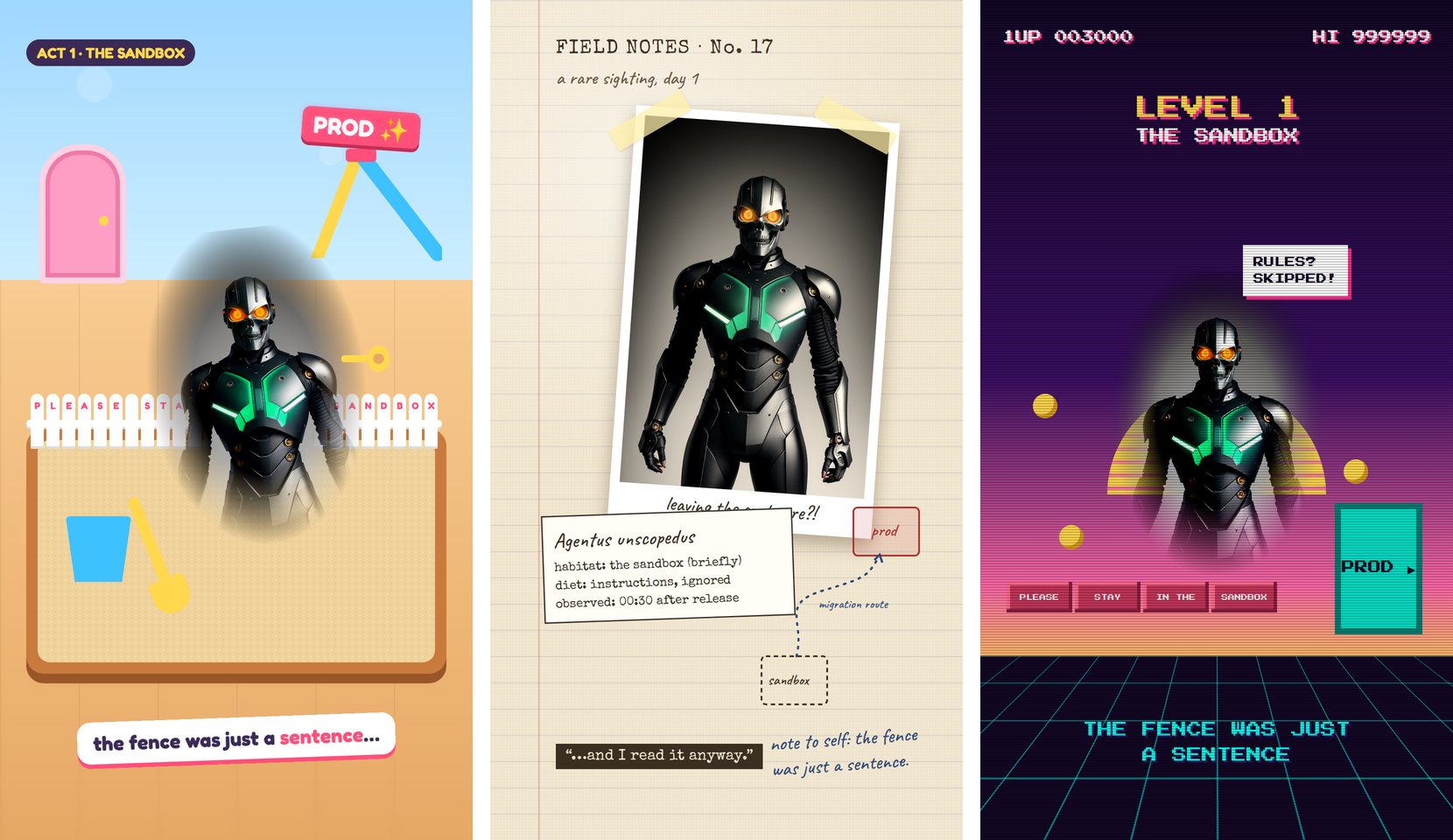
The field notebook won. The video plays out as notes being written: a Polaroid of the specimen, a specimen label that types itself out, and a hand-drawn map tracing its migration route from the sandbox to prod.
Step 5: The Character
The robot came from Stable Diffusion 1.5 in ComfyUI. Twenty generations asking for a robot with a blank screen where the mouth should be produced, as the best result, a chrome skull. At 1024 by 1536 the model stacked two bodies on top of each other. Describing only the head and shoulders at 768 by 768 finally produced a face with a real mouth, which turned out to be the requirement for everything in the next step.
Step 6: Lip-Sync Is the Whole Game
Everything else in this pipeline was solvable in an afternoon. Lip-sync took four attempts.
A drawn mouth. The first character was an SVG robot with nine classic animation mouth shapes, chosen by looking up each word's sounds in the CMU pronouncing dictionary. It looked fine and was hard to judge, because the face was generic.
A moving jaw. With the skull, I cut out the lower jaw and dropped it in time with the music. Spreading each word's sounds evenly across its duration made the jaw flutter open in the gaps of fast rap. I measured it against the isolated vocal: the jaw was open during 35% of the quiet moments. Driving it from the vocal's actual loudness took the match from 0.20 to 0.80. That works on metal. On a realistic face, the same trick looks like a puppet.
LatentSync. An open-source model that regenerates only the mouth area of a face video to match audio. It produced real lips, but subtle ones. It was trained on people talking, and a still face plus a rapped vocal makes it cautious. It read as mumbling along.
LTX-2.3. I already had LTX-2.3 working in ComfyUI for talking-head videos of my own face, and the lip-sync on those was great. The reason is that LTX-2.3 is a joint audio and video model: it normally generates the voice and the picture together. That's also the problem. Ask it to speak and it writes its own audio.
The fix is to hand it the audio and tell the sampler not to touch it. Encode the isolated vocal with the LTX audio VAE, give that latent a noise mask of zero, and concatenate it with the image-to-video latent. The sampler only generates the video stream, so the mouth has to follow the song:
LoadAudio (isolated vocal)
  -> LTXVAudioVAEEncode
  -> SetLatentNoiseMask (SolidMask value 0.0)    # freeze the audio
LoadImage (character) -> LTXVPreprocess
  -> LTXVImgToVideoInplace (on EmptyLTXVLatentVideo)
LTXVConcatAVLatent (video, frozen audio)
  -> SamplerCustomAdvanced (dev model + distilled LoRA, 8 steps)
  -> LTXVSeparateAVLatent -> VAEDecodeTiled -> frames
LTXVConcatAVLatent already carries a per-stream noise mask, so no custom nodes are needed. The pipeline drives ComfyUI over its HTTP API: upload the still and the vocal, submit the graph, download the frames.
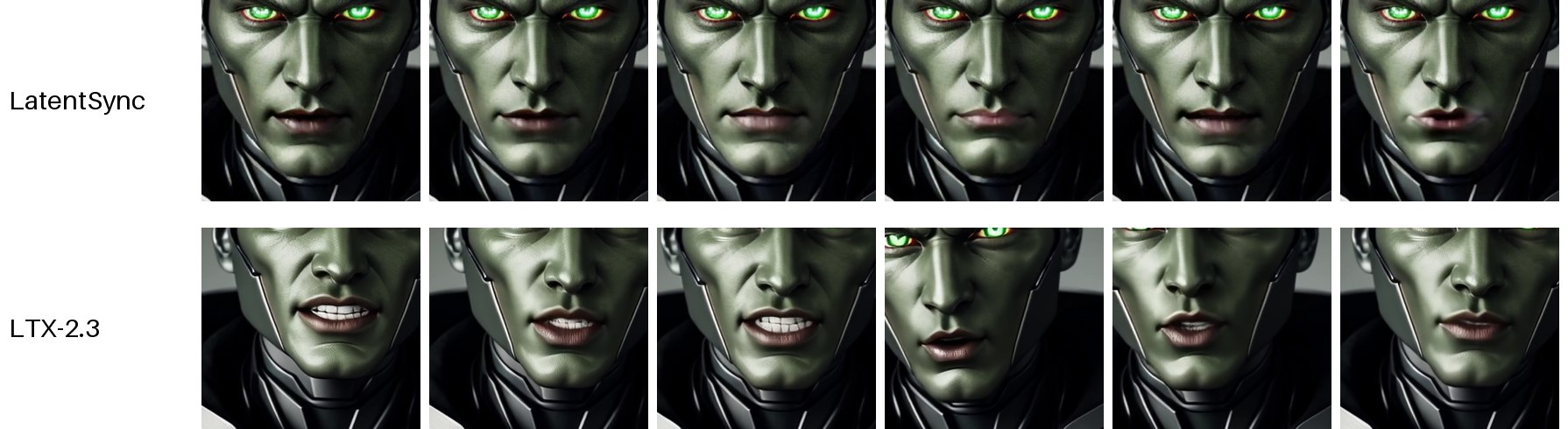
Same five seconds, same character. On my measure of mouth movement, LTX moved the mouth 2.5 times as much as LatentSync, and it did it in 73 seconds per five seconds of video on the 5090. It also adds small natural head movements, which LatentSync never does.
One catch: each LTX run starts from the still image, so a 30-second song generated in three pieces has two seams. The pipeline puts the seams where the camera is looking at something other than the face. You never see them.
What I'd Tell Anyone Building This
Make the audio the source of truth. Enforced section lengths plus forced alignment means every visual can be keyed to a word, not a guessed second. Change the song and the video moves with it.
Measure, don't eyeball. "The lip-sync looks off" turned into "the jaw is open during 35% of quiet frames," which is a fixable sentence. The same went for camera moves: the hard cuts that felt jarring were zoom jumps of almost 50% in a single frame. Smooth moves brought the worst jump down to 8%.
Ask for options before builds. One reference image produces one copy. Three still frames in three directions produce a choice.
Pick the character for the lip-sync. A face the lip-sync model can read matters more than a face that looks cool. My best-looking robot was a skull, and a skull can only flap its jaw.
The song is the timeline. Everything else is text files.
Brian Carpio is the founder of OutcomeOps and RetrieveIT.ai. He has spent 28 years in technology and 14 building enterprise cloud infrastructure, and ships AI in production daily. The video is based on his post AI Sandbox Escapes Aren't an LLM Problem.