Send Zabbix Alerts To HipChat
In my current environment we use HipChat extensively for communication, and our CI server sends a lot of events to HipChat so I figured I would send Zabbix alerts there as well. This is a pretty simple how-to and should only take you about 10 minutes to implement.
Setup HipChat and Script
The first thing you are going to want to do is figure out the following information:
- •HipChat API Token
- •Room ID
It was pretty easy to get this information. To get the HipChat API Token from the HipChat API Documentation once I created my API token I simply needed to figure out what the Room ID was. I wasn't able to find the Room ID from the HipChat client so I had to log into the web interface and noticed what the room ID was from the URL in my browser.
Next, I needed to clone the following repo:
https://github.com/hipchat/hipchat-cli
Once I cloned the repo I copied the hipchat_room_message script to /usr/local/bin on my Zabbix server.
Setup Zabbix
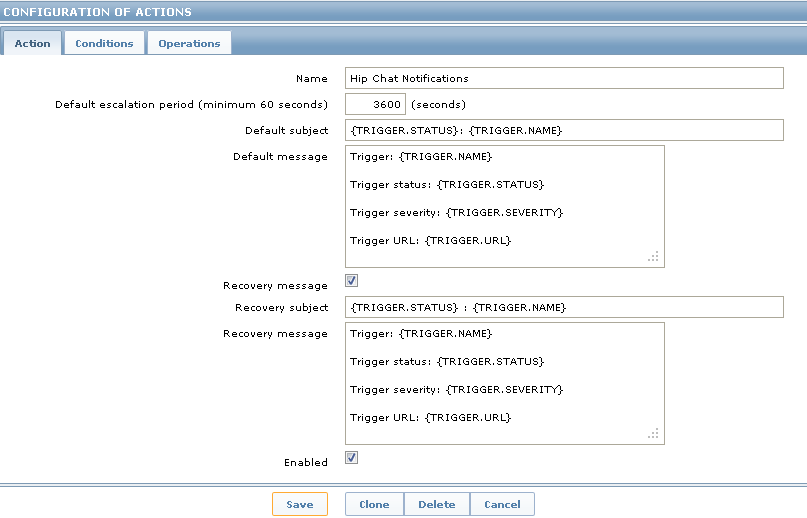
Finally I simply needed to setup my Zabbix server to send the actual HipChat messages. Simply log into the Zabbix UI, go to configuration >> actions and press the "Create action" button:
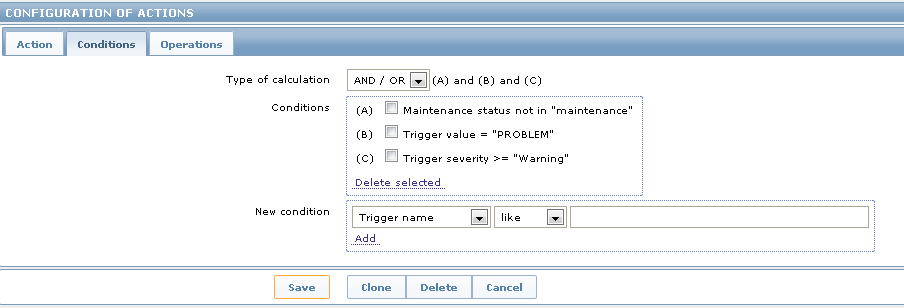
Next configure your conditions tab, for this example I only wanted "Warning" and higher messages, you can configure this however you see fit for your environment:
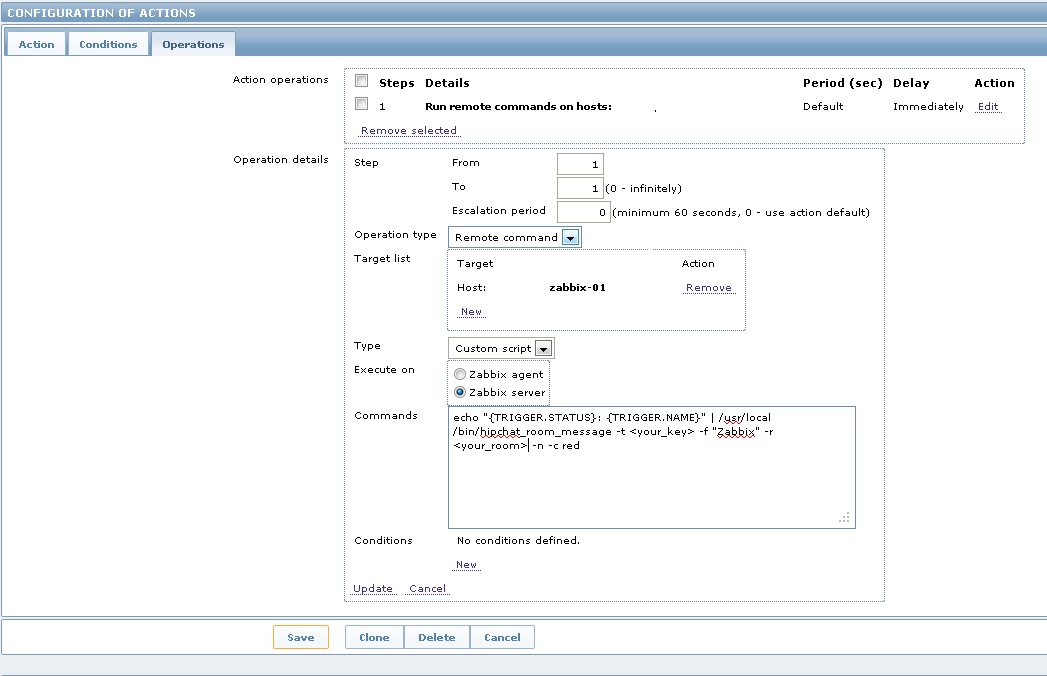
Finally, you simply need to setup your operation. This is where you need to plugin your API Token and Room ID. Also make sure to set the "Host Target" to your Zabbix server or the script will try and run from the system that triggered the alert.
Hopefully this helps you out!
Community Tips
Some helpful tips from readers over the years:
Recovery Notifications
Dave: To get recovery notifications, clone the action and set the conditions for the action to Trigger Value=OK, then change the command as needed.
chusiang: For sending OK status with a green message, create another action with these settings:
Conditions:
- •Maintenance status not in maintenance
- •Trigger value = OK
Operations:
echo "{TRIGGER.STATUS}:{TRIGGER.NAME}" | /usr/local/bin/hipchat_room_message -t <TOKEN> -f "Zabbix" -r <ROOM_ID> -n -c greenMobile Push Notifications
Chad: For push notifications to mobile devices, create a private room and use @all to make sure you get messages even when away or offline. However, you need to send messages using "-m text" otherwise it will not translate the @ to a mention.
Self-Hosted HipChat
Paul M: For self-hosted HipChat servers, add "-o hipchat.example.com -v v2" to use your own HipChat server and API version 2.